Licenses
Licenses authorize producers to conduct business in relation to specific products and jurisdictions. Each license is associated with one producer. Products can be configured to require producers associated with a quote or policy transaction to have a valid license when an underwriting request is processed.
Licenses can contain extension data. Extension data for licenses supports media data.
Lifecycle
The following diagram illustrates the lifecycle for licenses:
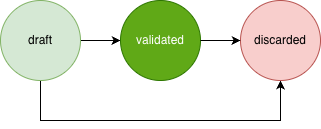
Licenses begin in the draft state after creation and will move to the validated state following a successful validation request.
Licenses in the draft or validated states will move to the discarded state following a successful discard request. Once licenses are moved to the discarded state, they cannot be moved back to the validated state and cannot be used again.
Configuration
Before licenses can be created, they must be defined within the producerLicenses object in the producerManagement configuration object.
For example:
{
    "producerManagement": {
        "producerLicenses": {
            "ExampleProducerLicense": {
                "abstract": true,
                "extend": "AnotherProducerLicense",
                "data": {},
                "defaultSearchable": false
            }
        }
    }
}
Licenses can be defined as abstract, meaning they cannot be created directly. Licenses can inherit data from the license specified in the extend field.
Extension data can be defined in the data field.
The defaultSearchable field can be used to modify search behavior.
Create a License
Once your configuration changes have been deployed, create a license through the Create Producer License API endpoint.
Here’s an example request:
{
    "type": "ExampleProducerLicense",
    "licenseNumber": "34677263",
    "producerCodes": ["43668", "84634"], // An empty list means all producer codes associated with a producer
    "jurisdictions": ["CA", "FL"], // An empty list means all jurisdictions
    "products": ["CommercialAuto", "CommercialProperty"], // An empty list means all products
    "effectiveTime": "2026-06-15T00:00:00Z",
    "expirationTime": "2027-06-15T00:00:00Z",
    "data": {}
}
The request object contains the following fields:
type- The name of a license listed in theproducerLicensesconfiguration objectlicenseNumber- A license number associated with the licenseproducerCodes- The producer codes covered by the licensejurisdictions- The jurisdictions covered by the licenseproducts- The products covered by the licenseeffectiveTime- When the license becomes activeexpirationTime- When the license expiresdata- Extension data
An empty list for producerCodes, jurisdictions, or products means the license applies to all possible values for the given field.
The producerCodes field can include producer codes associated with the producer and producer codes associated with producers contained within the producer hierarchy.
License details can be updated through the Update Producer License API endpoint. Expired licenses can be renewed by updating the effectiveTime and expirationTime values.
Use the Validate Producer License API endpoint to validate a license.
Refer to the Producer Management API index for additional API endpoints.
Underwriting Criteria for Licenses
Products can be configured to require producers associated with a quote or policy transaction to meet the following underwriting criteria:
Producers must have a non-expired license currently in effect and in the
validatedstate for the product.Producers must have a license associated with the
jurisdictionthat matches thejurisdictionassociated with the product. See the Jurisdictions feature guide for more information.
These requirements can be enabled by setting the producerQualification field at the top level of the ProductRef configuration to license. The default value is none.
If the producerQualification field is set to license, and a quote or policy transaction associated with a producer fails to meet the above underwriting criteria, underwriting requests will fail, and the system will automatically add an underwriting flag to the quote or policy transaction. See the Producers feature guide for more information.
Underwriting criteria for licenses are evaluated based on the producerCode associated with a quote or policy transaction. The producerCodeOfRecord associated with a quote or policy transaction has no effect on underwriting criteria for licenses.
Note
These requirements are only enforced if a quote or policy transaction is associated with a producer. If a product is not associated with a jurisdiction, producers associated with the product are not required to have an association with any specific jurisdiction.
Here’s an example product configuration:
{
    "products": {
        "CommercialAuto": {
            "producerQualification": "license" // none | license | appointment - The default value is none
        }
    }
}