Producers
Producers refer to individuals or organizations authorized to conduct business on behalf of an insurance company or potential client, such as agents and brokers.
Each producer is associated with one or more producer codes, which can be used to categorize the work performed by a producer. Only one producer can be associated with a given producer code. Each producer can specify a parent producer, forming a producer hierarchy.
Quotes and policies can be associated with a maximum of one producer code at a time.
Products can be configured to require producers associated with a quote or policy transaction to have a valid license or appointment when an underwriting request is processed. See the Licenses and Appointments feature guides for more information.
Producers and producer codes can contain extension data. Extension data for producers and producer codes support media data.
Lifecycle
The following diagram illustrates the lifecycle for both producers and producer codes:
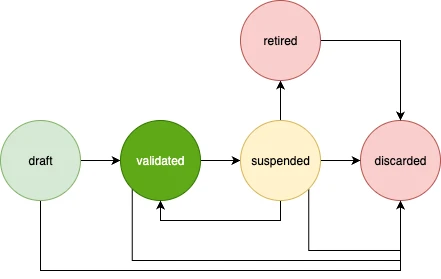
Producers and producer codes begin in the draft state after creation and will move to the validated state following a successful validation request.
Producers and producer codes can be moved to the suspended state to temporarily prevent them from being used until they are moved back to the validated state following a successful unsuspend request. Once producers and producer codes are moved to the retired or discarded state, they cannot be moved back to the validated state and cannot be used again.
Note
Producer codes cannot be discarded if they are currently associated with a quote that has advanced beyond the draft state or a policy.
Configuration
Before producers and producer codes can be created, they must be defined within the producerManagement configuration object.
For example:
{
    "producerManagement": {
        "producers": {
            "ExampleProducer": {
                "abstract": true,
                "extend": "AnotherProducer",
                "data": {},
                "defaultSearchable": false
            }
        },
        "producerCodes": {
            "ExampleProducerCode": {
                "abstract": true,
                "extend": "AnotherProducerCode",
                "numberingPlan": "ExampleNumberingPlan",
                "numberingString": "ExampleText",
                "data": {},
                "defaultSearchable": false
            }
        }
    }
}
Producers and producer codes can be defined as abstract, meaning they cannot be created directly. Producers and producer codes can inherit data from the producer or producer code specified in the extend field.
Producer codes can be automatically generated based on the numberingPlan and numberingString specified in the configuration. We strongly recommend using a separate numbering plan for each producer code type to avoid potential duplication of producer codes. See the Entity Numbering feature guide for more information.
Extension data can be defined in the data field.
The defaultSearchable field can be used to modify search behavior.
Products can be configured to require producers associated with a quote or policy transaction to have a valid license or appointment when an underwriting request is processed.
Here’s an example product configuration:
{
    "products": {
        "CommercialAuto": {
            "producerQualification": "license" // none | license | appointment - The default value is none
        }
    }
}
See the Licenses and Appointments feature guides for more information.
Create a Producer
Once your configuration changes have been deployed, create a producer through the Create Producer API endpoint.
For example:
{
    "type": "ExampleProducer"
}
The type field refers to the name of a producer defined in the configuration. The parentLocator field can be used to specify a parent producer, forming a producer hierarchy.
For example:
{
    "type": "ExampleProducer",
    "parentLocator": "01CH383XHA23A"
}
Producer details can be updated through the Update Producer API endpoint.
Use the Validate Producer API endpoint to validate a producer.
Refer to the Producer Management API index for additional API endpoints.
Create a Producer Code
The Create Producer Code API endpoint can be used to create a producer code.
For example:
{
    "type": "ExampleProducerCode",
    "code": "9217262"
}
The producerLocator request parameter identifies the producer that will be associated with the producer code. Producer code details can be updated by using the Update Producer Code API endpoint.
The type field refers to the name of a producer code defined in the configuration. The optional code field refers to the producer code. The producer code must be unique. If no producer code is specified, a producer code will be automatically generated based on the numbering plan specified in the configuration for the producer code type.
Use the Validate Producer Code API endpoint to validate a producer code.
Refer to the Producer Management API index for additional API endpoints.
Associate a Producer Code with a Quote or Policy
You can associate a producer code with a quote by adding the following field to the top level of the request object when creating a quote or updating a quote:
{
    "producerCode": "9217262"
}
The producerCode value refers to the code value that was used when creating the producer code.
Producer codes associated with a policy can be updated through the Create a Policy Change Transaction API endpoint or any endpoint that accepts a ProducersChangeInstructionCreateRequest request object.
Here’s an example of a request for the Create a Policy Change Transaction API endpoint:
[
    {
        "action": "producers",
        "setProducerCode": "Example Code 2", // Optional - Update the producer code
        "clearProducerCode": false // Optional - Clear the producer code
    }
]
Producer codes must be in the validated state before they can be associated with a quote or policy.
Producer Code of Record
If a policy has an associated producer code, the policy will also be associated with a producer code of record, which refers to the original producer code for a term. The producer code of record will be set to the current producer code when a renewal transaction is issued.
The producer code of record associated with a policy can be updated manually through the Create a Policy Change Transaction API endpoint or any endpoint that accepts a ProducersChangeInstructionCreateRequest request object. Changes will be applied to a policy once a transaction is issued.
Here’s an example of a request for the Create a Policy Change Transaction API endpoint:
[
    {
        "action": "producers",
        "setProducerCodeOfRecord": "Example Code 3", // Optional - Update the producer code of record
        "revertProducerCodeOfRecord": false // Optional - Set the producer code of record to the current producer code
    }
]
Unlike producer codes, producer codes of record can be in the validated, suspended, or retired state when associated with a quote or policy.
Note
If the setProducerCodeOfRecord value is set to the current producer code value, the system will instead process the request as if the revertProducerCodeOfRecord value was set to true once the transaction is issued.
Producer Code History
The Fetch Policy Snapshot API endpoint can be used to view the producer code and producer code of record values associated with a policy at a specified point in time. These snapshots account for out-of-sequence transactions and the reapplication of policy renewals.
Here’s an example of the date query parameter:
2025-01-01T00:00:00Z
Add an Underwriting Flag for Invalid Producers
If any of the following conditions are true for a quote or policy transaction associated with a producer, underwriting requests will fail, and the system will automatically add an underwriting flag to the quote or policy transaction:
The producer code, its associated producer, or any of the producer’s parent producers are not in the
validatedstate.The
producerQualificationfield is set tolicensein the ProductRef configuration for the quote or policy, but the producer does not have a license that meets the license criteria. See the Licenses feature guide for more information.The
producerQualificationfield is set toappointmentin the ProductRef configuration for the quote or policy, but the producer does not have an appointment that meets the appointment criteria. See the Appointments feature guide for more information.
This underwriting flag can be customized through the underwritingFlag configuration object.
For example:
{
    "producerManagement": {
        "producers": {
            "ExampleProducer": {
                "abstract": true,
                "extend": "AnotherProducer",
                "data": {},
                "defaultSearchable": false
            }
        },
        "producerCodes": {
            "ExampleProducerCode": {
                "abstract": true,
                "extend": "AnotherProducerCode",
                "numberingPlan": "ExampleNumberingPlan",
                "numberingString": "ExampleText",
                "data": {},
                "defaultSearchable": false
            }
        },
        "underwritingFlag": {
            "level": "none", // none | block | reject | decline | info
            "tag": "Example tag", // Default is "Invalid Producer Qualification"
            "note": "Example note"
        }
    }
}
This underwriting flag can be removed from a quote or policy transaction like any other flag. This allows you to complete the underwriting process even if the producer is invalid.
If an underwritingFlag configuration is not provided, the system will automatically generate a configuration with level set to info.
See the Underwriting and Underwriting Plugin feature guides for more information on underwriting flags.
Plugins
Precommit Plugin
The Precommit Plugin can be used to modify the value of a producer or producer code before saving it to the database. See the Precommit Plugin feature guide for more information.
For example:
public class PreCommitPluginImpl implements PreCommitPlugin {
    private static final Logger log = LoggerFactory.getLogger(PreCommitPluginImpl.class);

    @Override
    public AgencyProducer preCommit(AgencyProducerRequest request) {
        AgencyProducer producer = request.producer();

        return request.producer().toBuilder()
            .data(producer.data().toBuilder().email("first.agency@socotra.com").build())
            .build();
    }

    @Override
    public SubAgencyProducer preCommit(SubAgencyProducerRequest request) {
        SubAgencyProducer producer = request.producer();

        return request.producer().toBuilder()
            .data(producer.data().toBuilder().email("first.subagency@socotra.com").build())
            .build();
    }

    @Override
    public CaliforniaProducerCode preCommit(CaliforniaProducerCodeRequest request) {
        CaliforniaProducerCode producerCode = request.producerCode();

        return request.producerCode().toBuilder()
            .data(producerCode.data().toBuilder().description("added by preCommit").build())
            .build();
    }
}
Validation Plugin
The Validation Plugin can be used to execute custom validation logic on a producer or producer code. See the Validation Plugin feature guide for more information.
For example:
public class ValidationPluginImpl implements ValidationPlugin {
    private static final Logger log = LoggerFactory.getLogger(ValidationPluginImpl.class);

    @Override
    public ValidationItem validate(AgencyProducerRequest request) {
        AgencyProducer producer = request.producer();

        if (!producer.data().status().equalsIgnoreCase("active")) {
            return ValidationItem.builder()
                .locator(producer.locator())
                .elementType(producer.type())
                .addError("producer must be active")
                .build();
        }

        return ValidationItem.builder().build();
    }

    @Override
    public ValidationItem validate(CaliforniaProducerCodeRequest request) {
        CaliforniaProducerCode producerCode = request.producerCode();

        if (!producerCode.data().status().equalsIgnoreCase("active")) {
            return ValidationItem.builder()
                .locator(producerCode.locator())
                .elementType(producerCode.type())
                .addError("producer code must be active")
                .build();
        }

        return ValidationItem.builder().build();
    }
}